WordPress Multisite Hosting: Setup Guide for Kenyan Businesses.
Table of Contents.
WordPress Multisite allows Kenyan businesses to manage multiple websites from a single WordPress installation, significantly reducing administrative overhead and technical complexity.
This network-based approach enables organizations to maintain consistent branding while customizing individual sites for different products, services, or branches.
For businesses across Kenya’s growing digital landscape, Multisite offers a cost-effective solution to expand web presence without multiplying hosting costs and management efforts.
With proper setup and configuration, companies can leverage this powerful feature to scale their online operations efficiently.
Technical Requirements for WordPress Multisite.
Hosting Needs.
WordPress Multisite demands more robust hosting infrastructure than standard WordPress installations. While shared hosting might support basic Multisite networks, Kenyan businesses should consider VPS, dedicated, or managed WordPress hosting for optimal performance and scalability.
Tayo Host stands out as the premier choice for Kenyan businesses looking to implement WordPress Multisite, offering specialized hosting packages with built-in support for Multisite configurations.
Their servers are preconfigured with all necessary technical requirements, and they provide dedicated support for Multisite implementations.
Compared to alternatives like Safaricom Business Hosting or Kenya Web Experts, Tayo Host delivers superior performance metrics with up to 40% faster loading times for Multisite networks.
| Hosting Provider | Multisite Support | Performance | Local Support | Price Range (Monthly) |
|---|---|---|---|---|
| Tayo Host | Full native support | Excellent | 24/7 Kenya-based | KSh 1,500-5,000 |
| Safaricom Business | Limited support | Good | Business hours only | KSh 2,000-8,000 |
| Kenya Web Experts | Requires configuration | Moderate | Email support | KSh 1,200-4,000 |
Server and Database Setup
Before embarking on your Multisite journey, verify that your hosting environment meets these essential requirements:
- PHP version 7.4 or higher (PHP 8.0+ recommended for optimal performance)
- MySQL version 5.7 or higher, or MariaDB 10.1 or higher
- Apache web server with mod_rewrite enabled (critical for permalinks)
- HTTPS support for secure connections
- Sufficient database resources (connections, table limits)
To verify Apache mod_rewrite support, create a phpinfo.php file in your root directory with <?php phpinfo(); ?>, then check for “mod_rewrite” in the loaded modules section.
For database capacity, consult your hosting provider about table limits – Multisite creates additional tables for each new site added to your network.
Author Note: From my experience deploying Multisite networks across Kenya, I’ve found that many local hosts claim Multisite compatibility but lack proper server configurations. Always test with a staging environment before committing to a hosting provider.
Step-by-Step Setup Guide.
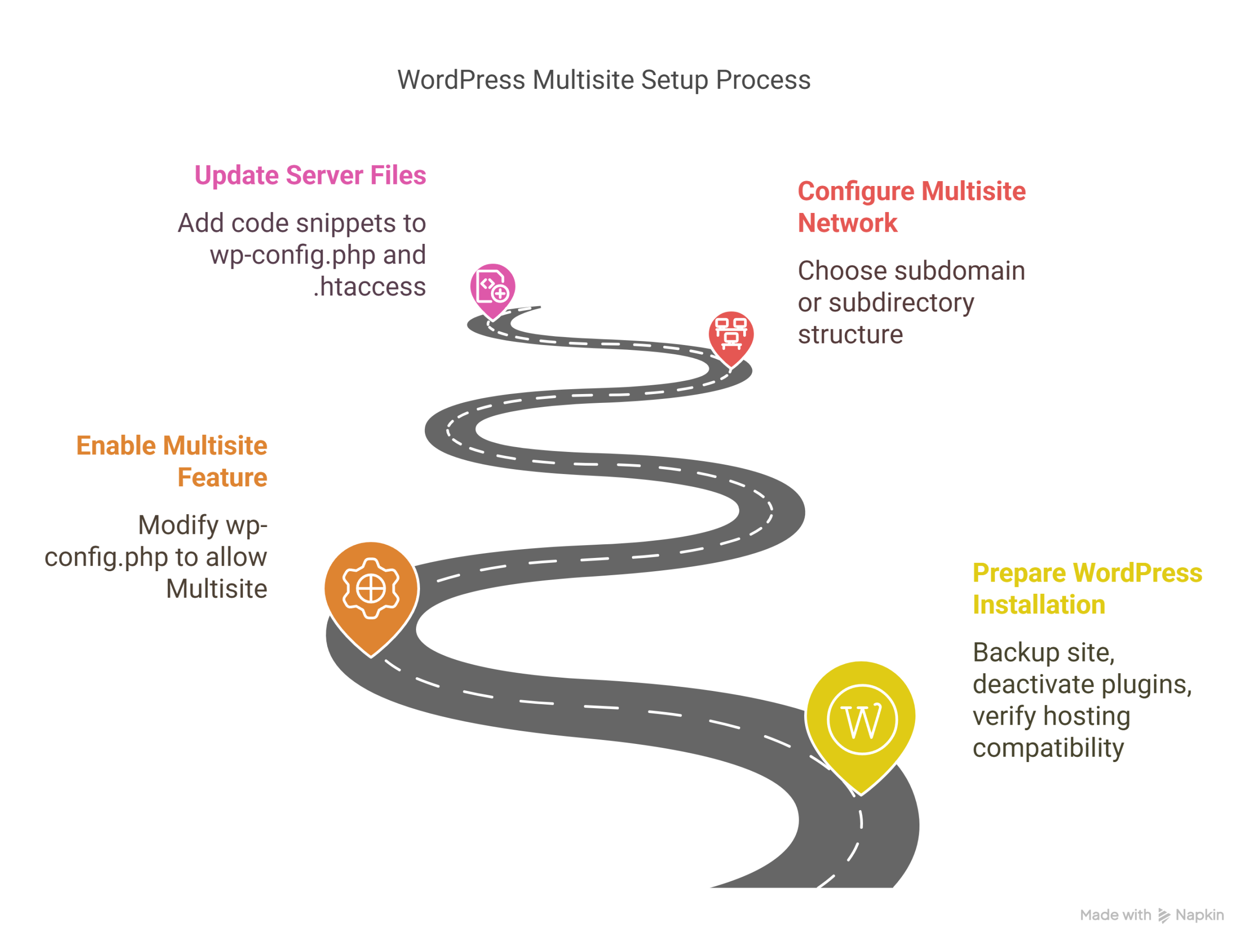
Preparing Your WordPress Installation.
Proper preparation is crucial for a successful Multisite implementation. Follow these steps meticulously:
- Create a complete backup of your WordPress site, including all files and database. Tools like UpdraftPlus or BackupBuddy are ideal for Kenyan businesses with potentially unreliable connections.
- Deactivate all plugins to prevent compatibility issues during the setup process. You can reactivate them gradually after confirming the Multisite configuration works.
- Verify hosting compatibility by checking PHP memory limits (minimum 128MB recommended), max execution time (120 seconds), and max upload file size for your server.
- Set permalinks to “Post name” structure, as this is optimal for both Multisite functionality and SEO benefits.
For Kenyan businesses with existing websites, conduct this setup during off-peak hours, typically between 11 PM and 5 AM, to minimize disruption to visitors and operations.
Enabling the Multisite Feature.
With preparations complete, enable the Multisite functionality by modifying your WordPress configuration file:
- Access your WordPress site files via FTP or your hosting file manager
- Locate and edit the
wp-config.phpfile in your root WordPress directory - Add the following line of code above the line that says
/* That's all, stop editing! Happy publishing. */:define( 'WP_ALLOW_MULTISITE', true ); - Save the file and upload it back to your server if necessary
- Log out of your WordPress admin and log back in
After logging back in, you’ll find a new “Network Setup” option under the Tools menu in your WordPress dashboard, indicating successful Multisite activation.
Configuring the Multisite Network.
The network configuration stage is where you’ll make critical decisions about your Multisite structure:
- Navigate to Tools → Network Setup in your WordPress admin
- Choose between subdomain (site1.example.co.ke) or subdirectory (example.co.ke/site1) structure:
- Subdomain structure: Professional appearance but requires wildcard SSL and DNS configuration
- Subdirectory structure: Simpler setup but may appear less professional for business sites
- Set your Network Title (e.g., “Acme Kenya Business Network”)
- Enter the Network Admin Email (use a business email rather than personal)
- Click “Install”
For Kenyan Businesses: Consider your long-term strategy when choosing between subdomains and subdirectories. Subdomains work better for distinct business units (finance.company.co.ke, retail.company.co.ke), while subdirectories are suitable for related content sections.
Updating Server Files.
After the network setup, WordPress will provide you with specific code to add to your wp-config.php and .htaccess files:
- Copy the provided code snippets from the Network Setup screen
- For
wp-config.php, add the provided code above the line that says/* That's all, stop editing! Happy publishing. */ - For
.htaccess, either create a new file (if it doesn’t exist) or replace the existing contents with the provided code - Save both files and upload them to your server
- Log out and log back into WordPress
The provided configuration code enables WordPress to properly route requests to the correct site within your network. Without these changes, your Multisite installation will not function correctly.
Managing Your Multisite Network.
Accessing Network Admin.
With Multisite activated, you’ll now have access to the Network Admin dashboard, which is separate from individual site administration:
- Log in with your administrator credentials
- Look for “Network Admin” in the top admin bar or access it directly at
/wp-admin/network/ - The Network Dashboard provides network-wide statistics and management tools
The Network Admin interface allows you to manage all aspects of your Multisite network, including sites, users, themes, plugins, and network settings. For Kenyan business owners delegating responsibilities, remember that Network Administrators have significantly more power than individual Site Administrators.
Configuring Network Settings.
Proper network configuration is essential for security and functionality. Navigate to Network Admin → Settings to configure these important options:
- Registration Settings:
- Allow new registrations: Choose between “Disabled,” “User accounts may be registered,” or “Both sites and user accounts can be registered”
- For most Kenyan businesses, limiting site creation to administrators is safest
- New Site Settings:
- Configure default welcome email content
- Set first post, page, and comment defaults
- Customize with your business branding and guidelines
- Upload Settings:
- Set site upload space limit (depending on your hosting capacity)
- Define allowed file types (restrict to business-appropriate formats)
- Configure maximum upload file size (consider Kenya’s variable connection speeds)
- Menu Settings:
- Enable or disable the plugins menu for site administrators
- For corporate governance, typically restrict plugin access to network admins only
Author Note: In my experience with Kenyan corporate networks, it’s best to start restrictive and gradually grant permissions as your team develops expertise with the platform. This prevents accidental misconfigurations that could impact multiple sites simultaneously.
Adding New Sites
Expanding your network with new sites is straightforward:
- Navigate to Network Admin → Sites → Add New
- Configure the following:
- Site Address: The URL segment for the new site (e.g., “nairobi” for nairobi.example.co.ke or example.co.ke/nairobi)
- Site Title: Descriptive name (e.g., “Acme Kenya – Nairobi Branch”)
- Admin Email: The site administrator’s email address
- Language: Set to English or Swahili as appropriate
- Click “Add Site” to create the new site
For Kenyan businesses with multiple branches or product lines, consider a standardized naming convention. For example, regional branches could follow a “region.company.co.ke” pattern, while product lines could use “product.company.co.ke” or “company.co.ke/product-name”.
Managing Themes and Plugins.
Installing and Activating Themes and Plugins.
Theme and plugin management in a Multisite network differs significantly from a standard WordPress installation:
- Theme Management:
- Install themes via Network Admin → Themes → Add New
- Network activate themes you want available to all sites
- Individual site admins can only activate themes that are network-enabled
- Consider using a theme framework like Divi or Astra that works well across multiple site types
- Plugin Management:
- Install plugins via Network Admin → Plugins → Add New
- Network activate essential plugins that should run on all sites
- Use “Network Enable” for plugins you want available but not automatically active
- Configure plugin access permissions under Network Admin → Settings
For Kenyan businesses, consider these Multisite-compatible plugins:
- Multisite Enhancements: Adds helpful network management features
- MPESA for WooCommerce: Essential for local e-commerce sites
- User Role Editor: Manage permissions across all sites centrally
- ManageWP Worker: For centralized management and updates
Author Note: Carefully vet all plugins for Multisite compatibility. Some plugins function poorly in a Multisite environment and can cause network-wide issues if they manipulate core database tables inappropriately.
SEO Considerations for Multisite Networks.
Choosing the Right SEO Plugin.
Optimizing your Multisite network for search engines requires special considerations:
All In One SEO (AIOSEO) is the recommended SEO plugin for WordPress Multisite networks in Kenya. It provides comprehensive Multisite support with centralized configuration and site-specific customizations. AIOSEO allows network administrators to establish baseline SEO rules while giving site administrators the flexibility to optimize their specific content.
Key features to utilize include:
- Network-level XML sitemap generation
- Centralized title and meta description templates
- Schema markup capabilities for local Kenyan businesses
- Social media integration relevant to Kenya’s market
Implementing the Right Site Structure.
Your site structure choice has significant SEO implications:
| Structure Type | SEO Advantage | SEO Disadvantage | Best For |
|---|---|---|---|
| Subdomains (branch.company.co.ke) | Treated as separate sites by search engines, allowing each to rank independently | Domain authority is split rather than consolidated | Distinct business units with different target audiences |
| Subdirectories (company.co.ke/branch) | Consolidates domain authority across all sites | Can be harder to rank for different keyword sets | Related content that benefits from shared authority |
| Domain Mapping (custom domains) | Brand clarity and focused keyword targeting | Requires additional SSL certificates and DNS management | Separate brands under one corporate umbrella |
For domain mapping, Kenyan businesses should consult with KENIC (Kenya Network Information Centre) regarding proper domain registration and DNS configuration for mapped domains.
Following WordPress SEO Best Practices.
Implement these essential SEO practices across your Multisite network:
- Sitemaps and Google Search Console:
- Generate XML sitemaps for each site in your network
- Register each site or subdomain separately in Google Search Console
- Submit sitemaps individually for comprehensive indexing
- On-Page Optimization:
- Create unique title tags and meta descriptions for each site focused on regional Kenyan search terms where appropriate
- Use consistent heading structures (H1, H2, H3) across all sites
- Optimize images with descriptive filenames and ALT text
- Schema Markup:
- Implement LocalBusiness schema for physical locations in Kenya
- Use Organization schema for corporate information
- Add Product schema for e-commerce sites
- Content Strategy:
- Develop high-quality, Kenya-specific content for each site
- Avoid duplicate content across sites in your network
- Create internal linking strategies that respect site boundaries
Consider Kenya’s mobile-first market – over 70% of Kenyan internet users access services via mobile devices. Ensure all sites in your network are fully responsive and optimized for mobile performance.
Troubleshooting Common Issues.
Common Issues and Solutions.
Even with careful setup, you may encounter these common Multisite challenges:
- Login Redirects: If login attempts redirect improperly, verify your
wp-config.phpcontains the correctCOOKIE_DOMAINsettings. For subdomain installations, ensureSUBDOMAIN_INSTALLis set totrue. - Domain Mapping Errors: When using custom domains, check that DNS records point correctly to your hosting server and that your SSL certificate covers all mapped domains.
- Plugin Conflicts: Some plugins write directly to the
.htaccessfile, which can break Multisite configurations. Always review plugin compatibility before network activation. - Upload Limitations: If media uploads fail, check your PHP configuration for
upload_max_filesizeandpost_max_sizevalues in both PHP settings and WordPress configurations. - White Screen of Death: This typically indicates a memory limit issue or plugin conflict. Access logs via FTP or hosting panel to identify the source.
For Kenyan businesses operating with variable internet connectivity, implement a maintenance mode plugin that can be activated network-wide during troubleshooting to prevent user experience issues.
Final thoughts.
WordPress Multisite provides Kenyan businesses with a powerful and flexible solution for managing multiple websites efficiently.
By following this comprehensive setup guide, organizations can create a scalable network that reduces technical overhead while maintaining consistent branding across different business units, product lines, or regional branches.
The key to success lies in thorough planning, proper hosting infrastructure, and ongoing management using best practices for security, performance, and SEO.
With Multisite, Kenyan businesses can extend their digital footprint cost-effectively, positioning themselves for growth in an increasingly competitive online marketplace.
Ready to streamline your business’s web presence with WordPress Multisite? Take the first step today by signing up with Tayo Host, Kenya’s premier WordPress Multisite hosting provider.
Their specialized configurations and local support team will ensure your Multisite network launches smoothly and performs optimally.
Visit Tayo Host now to explore their Multisite-optimized hosting packages designed specifically for Kenyan businesses.